
Kakeibo App Comparison: 4 Money Apps to Quiet Financial Anxiety
Comparing 4 kakeibo apps by the anxiety they solve: Money Forward ME, Zaim, OsidOri, Moneytree.
 By Mina KiryuEditor-in-Chief / Money & Household Finance·2026.07.24 published·2026.09.06 updated·7 min read·3 sources
Can you say exactly how much is in your bank account right now? When that question makes you freeze, the anxiety is not really about the number—it is about not seeing it. You are not afraid because the balance is small; you are afraid because you do not know what it is. Kakeibo, the household ledger invented by Motoko Hani in 1904 for Japanese readers, has now been published long enough that its publisher, Fujin-no-Tomo Sha, marks a 120th anniversary for the ledger.
It survived that long not through willpower rhetoric but through one plain mechanism: writing it down makes it visible. Along the way it traveled abroad and came back to us as a global idea, covered by outlets such as CNBC in a piece titled Kakeibo: How this Japanese budgeting system made me richer. The notebook became an app, but the logic is unchanged: once money becomes a number you can see, the fear becomes something you can hold.
In this guide we compare four major kakeibo apps used in Japan, sorted by which anxiety each one actually addresses—can you use it free, can you share it with a partner, can you use it without linking any accounts, and how should you think about safety before you connect anything at all.
What Is a Kakeibo App? The Basics Before You Compare
A kakeibo app is a tool that pulls transactions from your bank accounts, credit cards, e-money, and brokerage accounts into one place, sorts spending into categories automatically, and shows your cash flow and net worth on a single screen. Think of it as the paper ledger's three jobs—record, categorize, review at month end—rebuilt so the recording part costs you almost no effort. There are broadly two input styles: linked mode, where accounts sync automatically, and manual mode, where you photograph receipts or type entries yourself and connect nothing. Both are valid; the second matters a lot for readers who would rather not link anything, and we return to it below.
Why is this a story about anxiety rather than budgeting? There is a term called money dysmorphia—a gap between your actual finances and how poor you feel. In a Credit Karma survey reported by CNBC on March 13, 2024, 43% of Gen Z and 41% of millennials were found to experience it. Revenge saving, where higher earners hoard obsessively out of scarcity fear, grows from the same root. Both share one cause: not looking at the numbers. When you do not look, the guess in your head drifts, and it almost always drifts toward the worse.
Which means a kakeibo app is, before anything else, closer to a device that dissolves money dysmorphia with data than to a coupon-clipping tool. To be clear, no app can be promised to remove financial anxiety, and how much relief you feel will vary from person to person. But the shift from I do not know to I know tends to register faster than any amount you actually save. Japan adds its own context: the ledger began as a practical manual aimed at homemakers and has become a general-purpose tool used by solo renters and dual-income couples alike.
Why It Works: The Mechanism Behind the Comparison
Why does Japan's kakeibo culture pair so naturally with apps? Three reasons. First, kakeibo was itself an invention of category-based accounting. Deciding on buckets—food, utilities, education—and assigning every yen to one is exactly the logic behind automatic transaction tagging. What a person once did by hand at the kitchen table, the app now does at the moment of import.
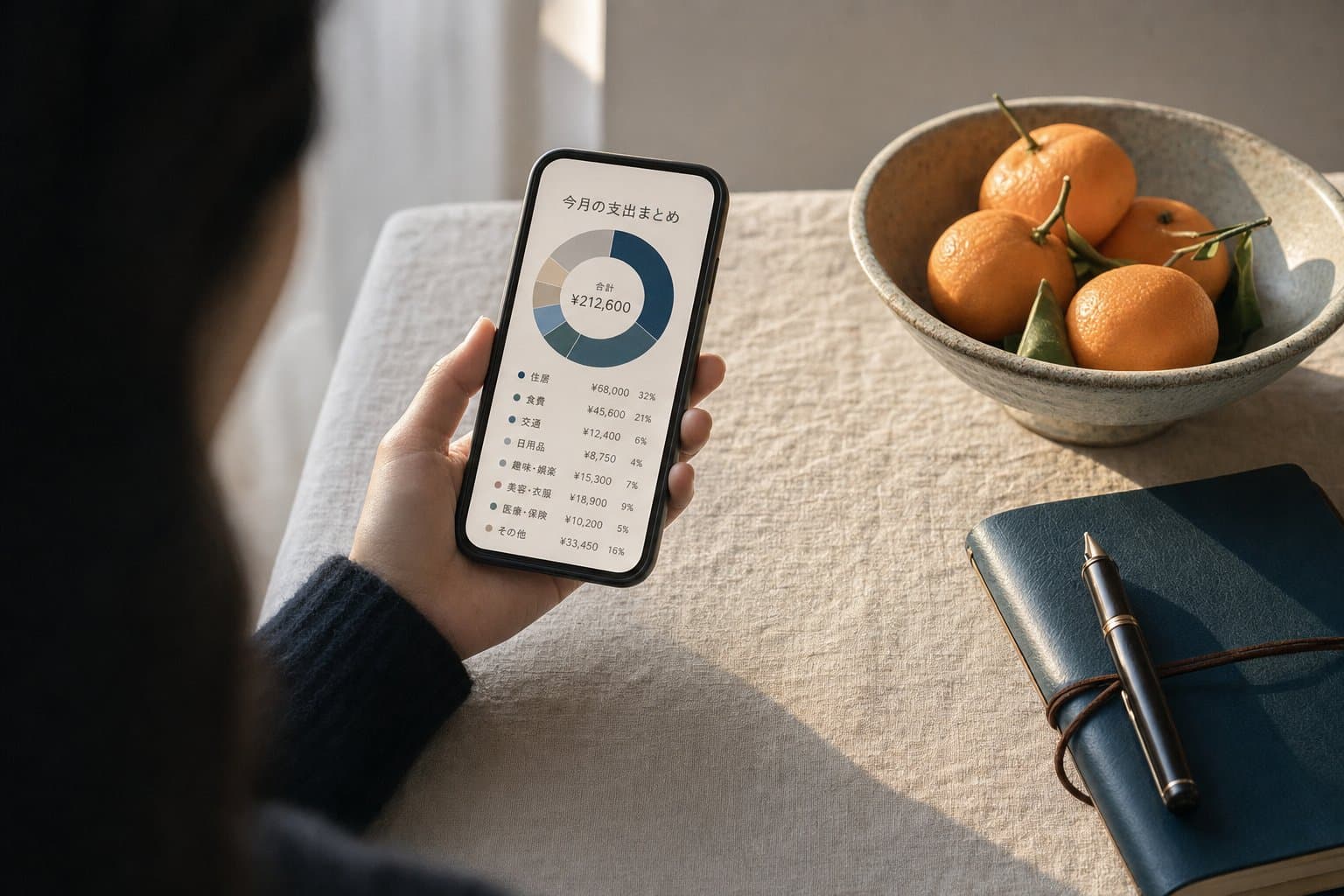
Second, Hani's monthly cycle of budget, record, reflect maps cleanly onto the monthly report screen in every modern app. The chart your app produces at month end is not a new invention; it is the digital form of a ritual that has been running for 120 years. Third, Japanese household finance is unusually fragmented: a salary account, a separate account for direct debits, a savings account, a brokerage account, and several e-money balances and point systems on top.
That fragmentation is precisely what makes people feel they cannot see the whole picture, and it is why unified dashboards matter so much in this market.
Now let us clear up a common misconception: that a kakeibo app is a saving app. It is not. The app does not reduce your spending. All it does is show you what happened; every decision after that is still yours. What changes is the quality of the material you decide with. A vague sense of I think I am overspending gives you no instruction you can act on. But when the same month appears as a category with a visible size next to it, the question becomes concrete: keep this subscription or cancel it. The mechanism is not stronger willpower. It is higher resolution in decision-making.
One more thing. Some people feel worse when they look at the numbers. If that is you, stop opening the app daily and check weekly or monthly instead—frequency is not virtue, and a rhythm you can sustain beats one you abandon. Results vary from person to person, and if your finances are genuinely in distress, talk to a qualified adviser or a public consultation service. An app is a map for decisions, not a cure.

App Comparison: Free, Couples, and No-Link Options
We organized publicly available information and compared four major apps on equal terms, by the anxiety each one addresses. Pricing, supported integrations, and features change often, so confirm the current details on each official site before deciding.
①【Money Forward ME】— For those who need to see everything. Broad auto-sync across banks, cards, brokerages, and e-money, with cash flow and net worth on one screen. The free tier is enough to get a first picture of the whole; check the paid tier's terms if you want to connect more institutions.
②【Zaim】— For those who want receipt-level control. Strong receipt capture and a distinctive feature that compares your spending against national household survey data. It is also a reasonable choice if you prefer to link nothing and type entries by hand. On the frequently asked question of how it differs from Money Forward ME: roughly, the former is stronger at a bird's-eye view of assets, the latter at granular records and manual operation.
③【OsidOri】— For couples who do not want money to become a fight. Two wallets live in one app, personal and shared, so private spending never has to appear on the shared side. If you are searching specifically for a couples app, start here.
④【Moneytree】— For those who want to quietly watch total assets. A calm interface and a unified view that can include investment and pension balances, suited to long-horizon tracking.
Four steps to start.
- Pick exactly one app based on your anxiety type.
- Connect just one account—or, if you prefer no linking at all, log by hand for one week.
- After a week, look at the category breakdown and write down the single item that surprised you.
- At month end, review, and set a budget for one category only.
Troubleshooting. If you cannot keep it up, you have probably connected too many accounts or you are opening the app too often; cut both, and check weekly. If the categories feel wrong, they are likely too fine-grained—collapse them into larger buckets. If linking makes you uneasy, start manual; nothing forces you to connect.
As for when to stop: if three months pass and nothing about your behavior has changed, switching apps rarely helps—narrowing to a single goal usually does. Related: Cash Stuffing pairs well with any app to restore the physical feel of spending.
The Takeaway: Choosing Your First App and Next Step
The cheapest way to lighten money anxiety is not investing or side-hustling—it is looking. Pick the one app closest to your anxiety, connect just one account, and give it a week. If linking makes you uncomfortable, log by hand for a week instead. Either way, the guess in your head starts getting replaced by an actual number, and that swap changes the internal weather more than you would expect.
Money Forward ME, Zaim, OsidOri, and Moneytree all have a free way to begin, so there is no need to pay before you know what you want. If you are torn, use this shortcut: see everything, Money Forward ME; receipts and manual entry, Zaim; share with a partner, OsidOri; quietly track net worth, Moneytree. How much relief you feel will vary from person to person, and if debt or living costs are genuinely pressing, talk to a qualified adviser or a public consultation service before you talk to an app. Numbers do not judge you. They just give you an outline. Today's step is simply to choose one app and open it.
FAQ
How much can I do with a kakeibo app for free?
All four apps here have a free way to start. In general, free and paid tiers differ on how many accounts you can link, how far back you can view history, and whether ads appear. The safer order is to link a single account within the free tier, see whether the habit sticks, and only then look at paid terms. Free-tier contents change over time, so confirm current details on each official site.
What is the difference between Zaim and Money Forward ME?
Roughly: Money Forward ME is strong at linking banks, cards, brokerages, and e-money to give you a single-screen view of assets and cash flow, while Zaim is strong at fine-grained category management through receipt capture and manual entry. Zaim also lets you compare your spending against national household survey data. If you want the big picture first, choose the former; if detailed records matter more, choose the latter.
Which app is best for couples?
OsidOri is the one designed around sharing. It keeps a personal wallet and a shared wallet in the same app, so spending you would rather not disclose never appears on the shared side, and you can look at the joint household together without full disclosure. It suits dual-income couples with complicated cost splits. Start by sharing only common categories such as rent and utilities, leaving personal spending in each private wallet.
Can I use one without linking my bank?
Yes. You can run any of these on receipt capture and manual entry alone, and some, such as Zaim, fit a manual-first style particularly well. You lose the convenience of automatic aggregation, but the awareness effect of recording remains. A staged approach works fine: log by hand for one week with nothing connected, then consider linking only if the habit sticks.
Are free kakeibo apps safe?
No service can be guaranteed absolutely safe. Useful things to check: whether the operating company is clearly identified, whether the privacy policy explains what data is collected and why, and whether extra verification such as two-factor authentication is offered. If linking still makes you uneasy, you can simply use the app in manual mode and connect nothing. Avoiding reused passwords is a basic safeguard either way.
Do I have to log every day for it to matter?
No. Even Hani's original method ran on a monthly cycle: set a budget, record, and reflect at month end. More frequent checking is not automatically better, and if seeing the numbers drags your mood down, weekly or monthly is more sustainable than daily. Responses vary from person to person, so set the rhythm you could realistically keep for three months.
About this article
This article was written by Mina Kiryu (Editor-in-Chief / Money & Household Finance) of the Tokyo Decoded editorial team, with sources and facts checked by the team. We keep editorial independence from advertisers. See our editorial policy.
Sources
Related

Pay Yourself First: Automate Your Savings Before You Spend
Failing to save isn't willpower—it's sequencing. Build an automatic system that moves money on payday.
Read more →
Sinking Funds: The FinTok Method for Predictable Surprises
Car inspections, holidays, birthdays — build monthly savings for predictable irregular expenses.
Read more →
Revenge Saving: The New Money Habit Pushing US Savings Rate to 4.9%
The anti-splurge movement sweeping the US in 2025, and why Japan was ready for it all along.
Read more →